
You don't need a big budget to launch a professional business website. WordPress powers over 40% of the web and is completely free to use — all you need is a domain and hosting. Here's a practical step-by-step guide to getting your South African business online without breaking the bank.
What "Free" Actually Means with WordPress
WordPress itself is open-source and free to download and use. The costs that do exist are unavoidable but minimal: a domain name (typically R150–R250/year in South Africa) and web hosting (from around R50–R150/month). Many hosting providers bundle a free domain for the first year, making startup costs very low.
If you need a truly zero-cost starting point, WordPress.com offers a free tier with a subdomain (e.g. yourbusiness.wordpress.com). It's limited, but it lets you test the platform before committing. For a proper business presence, self-hosted WordPress.org is the better choice.
Rather Have Experts Build It?
Skip the learning curve. Our team handles everything — design, development, and launch — so you can focus on running your business.
View Our Website Design ServicesStep 1 — Choose a Domain Name
Your domain name is your address on the internet (e.g. yourbusiness.co.za). A good domain should be:
- Short and easy to remember
- Relevant to your business name or industry
- A .co.za extension for South African credibility
- Free of hyphens or numbers where possible
Register your domain through a South African registrar such as Afrihost, WACS, or Xneelo. Many hosting packages include a free domain for the first year.
Step 2 — Set Up Hosting
Hosting is the server where your website files live. For WordPress, you need a hosting plan that supports PHP and MySQL. Look for:
- Shared hosting — cheapest option, suitable for new sites
- One-click WordPress installation — most South African hosts offer this via cPanel
- SSL certificate included — essential for security and Google rankings
- Local servers — choose a host with South African data centres for faster page load times
Popular affordable options for South African businesses include Afrihost, Hetzner, and Xneelo. Once your hosting is active and WordPress is installed, you can log in at yourdomain.co.za/wp-admin.
Step 3 — Install a Free Professional Theme
A WordPress theme controls the look and layout of your site. The WordPress theme repository has thousands of free options. For a professional business appearance, look for themes that are:
- Responsive (mobile-friendly)
- Lightweight and fast-loading
- Regularly updated and well-reviewed
- Compatible with popular page builders
Recommended free themes include Astra, OceanWP, and Kadence — all designed for business sites and highly customisable without coding. Install a theme by going to Appearance → Themes → Add New in your WordPress dashboard.
Pro tip: Pair a lightweight free theme like Astra with a free page builder plugin like Elementor or the built-in WordPress block editor (Gutenberg) for full drag-and-drop design control.
Step 4 — Install Essential Free Plugins
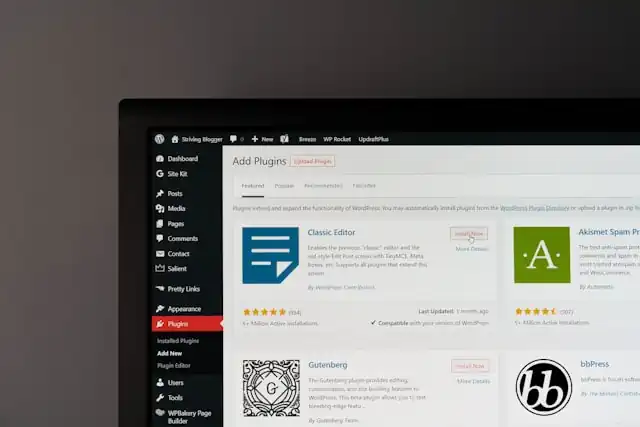
Plugins extend WordPress functionality. These free plugins cover the essentials for any business site:
- Yoast SEO or Rank Math — on-page SEO optimisation
- WPForms Lite — contact forms
- Wordfence Security — malware scanning and firewall
- UpdraftPlus — automated backups
- W3 Total Cache or LiteSpeed Cache — page speed and caching
- WooCommerce — if you plan to sell products online
Install plugins from Plugins → Add New. Avoid installing too many — every plugin adds potential security risk and speed overhead. Only install what you actually use.
Step 5 — Set Up Your Core Pages
Every professional business website needs a core set of pages. Create these first under Pages → Add New:
- Home — your headline, value proposition, and primary call to action
- About — your story, team, and why customers should trust you
- Services — what you offer, clearly described
- Contact — your address, phone number, email, and a contact form
- Privacy Policy — required for POPIA compliance in South Africa
Once your pages are created, set your homepage by going to Settings → Reading → Your homepage displays → A static page and selecting your Home page.
Need Help with SEO?
Ranking on Google takes more than a plugin. Our SEO team builds sustainable traffic for South African businesses.
Explore SEO ServicesStep 6 — Optimise for Search Engines (SEO)
A website that no one can find is not very useful. Basic SEO setup in WordPress is straightforward:
- Set a clear page title and meta description for every page using your SEO plugin
- Use your primary keyword naturally in the page heading (H1) and throughout the content
- Set up pretty permalinks — go to Settings → Permalinks and choose "Post name"
- Submit your sitemap to Google Search Console — your SEO plugin generates this automatically
- Add your business to Google Business Profile for local search visibility
- Make sure your site loads over HTTPS (your SSL certificate handles this)
For a deeper dive into ranking your site in South Africa, read our guide on automating your website SEO.
Step 7 — Make It Mobile-Friendly and Fast
Google uses mobile-first indexing, meaning your mobile experience directly affects your rankings. Most modern WordPress themes are responsive by default, but you should still:
- Preview every page on mobile before publishing
- Use compressed images (WebP format is ideal)
- Enable caching with a plugin like LiteSpeed Cache
- Test your page speed at Google PageSpeed Insights
Step 8 — Connect a Professional Email Address
Using a yourname@yourdomain.co.za email instead of a generic Gmail address builds trust instantly. Most hosting providers include email hosting. Set it up through cPanel and connect it to Gmail or Outlook for convenience.
When to Consider Professional Help
WordPress gives you a solid foundation, but there are situations where working with a professional website design agency makes more sense:
- You need a custom design that stands out from generic themes
- Your site needs advanced functionality (bookings, memberships, ecommerce)
- You don't have time to learn WordPress and maintain the site
- You want ongoing website maintenance and security monitoring
- Your existing site needs a redesign to improve conversions
If you fall into any of these categories, explore our affordable website packages tailored for South African small businesses.
WordPress is powerful. But a poorly built WordPress site can hurt your business more than no site at all.
Summary: Your Free WordPress Launch Checklist
- Register a .co.za domain
- Purchase affordable South African hosting with one-click WordPress install
- Install a free, responsive business theme (Astra, OceanWP, or Kadence)
- Install essential free plugins (SEO, security, backup, caching, contact form)
- Create your core pages: Home, About, Services, Contact, Privacy Policy
- Configure SEO settings and submit your sitemap to Google Search Console
- Test on mobile and optimise page speed
- Set up a professional email address
Following these steps will give you a professional, search-engine-ready WordPress website at the lowest possible cost. And when you're ready to take it further, CloudST is here to help.